



If you’ve attended one of our VILT TrendMiner trainings, you’ve probably seen a popular workaround: creating a daily aggregation tag that looks discrete (a clean stepwise plot) and updates once per day at midnight. You may have also seen Natasha’s post where she discusses how to build the stepped daily tag.
This is a simple but powerful technique when you want a tag that reports something like:
-
Daily average
-
Daily total
-
Daily max/min
-
Daily standard deviation
-
Any other 24-hour aggregation you want to visualize as a “daily value”
In training, we typically build this so the tag updates at midnight. But recently a user asked a great follow-up: can we build a similar tag that steps at a certain hour of the day instead of midnight?
Good news! You can do this with a small modification to the same workaround. In this post, I’ll walk through this modified approach that lets you step your daily aggregation at the hour to your liking.
Step the daily aggregation at 7:00 AM (or any hour)
In this walkthrough, we will display our daily value at 7:00 AM.
The midnight version uses TM_day_US_Central, which only changes once per day at midnight—so it’s perfect when midnight is your boundary.
But if you want your “day” to roll over at 7:00 AM, you need a time tag that lets you target a specific hour. That’s why we swap:
-
TM_day_US_Central→TM_hour_US_Central
Now we can tell TrendMiner: “Only step when the hour transitions from 6 → 7” (for a 7:00 AM boundary).
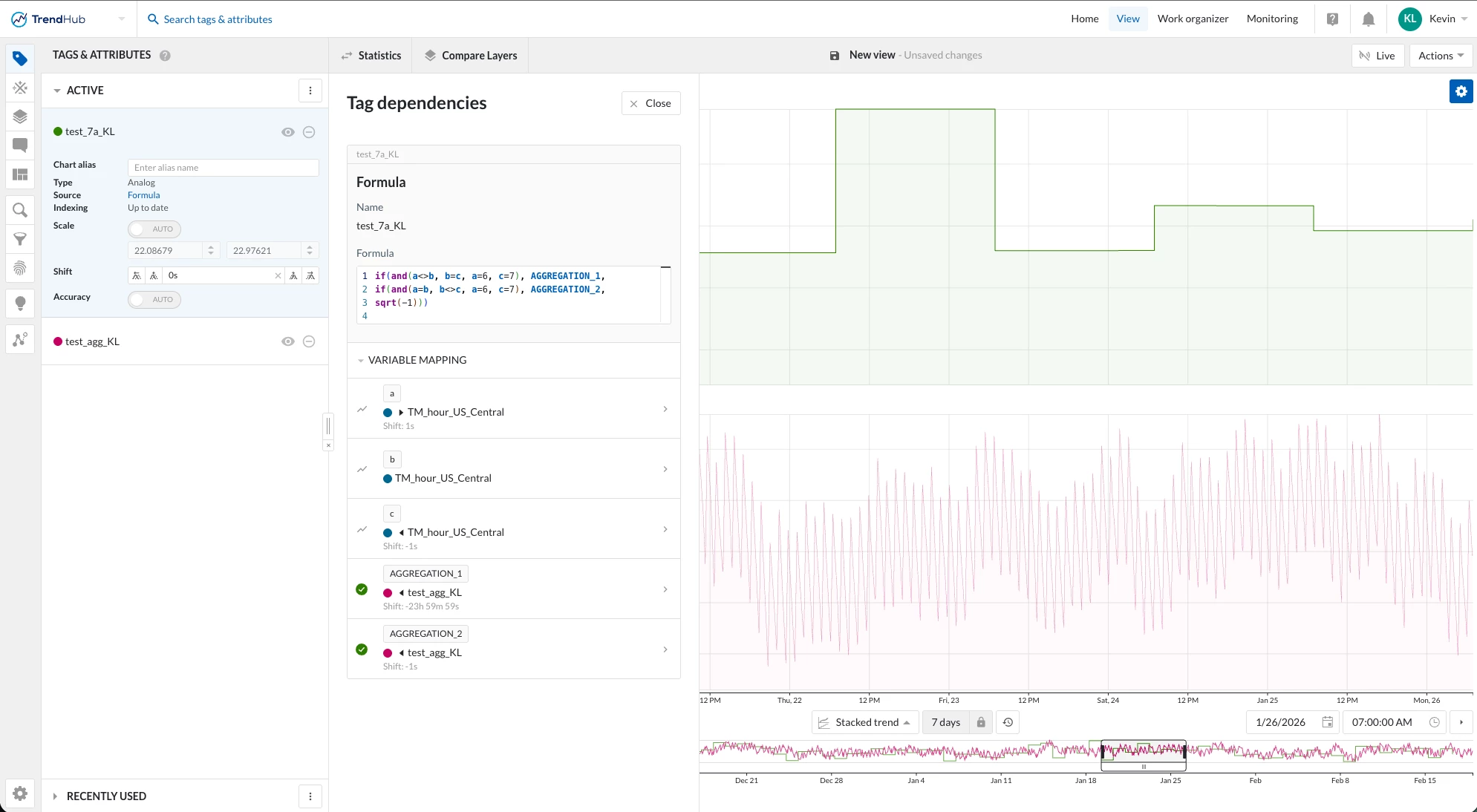
Here is the formula for the custom hour step:
if(and(a<>b, b=c, a=6, c=7), AGGREGATION_1,
if(and(a=b, b<>c, a=6, c=7), AGGREGATION_2,
sqrt(-1)))
What each variable means
Time tags
-
a=TM_hour_US_Centralwith Shift: +1s -
b=TM_hour_US_Centralwith no shift -
c=TM_hour_US_Centralwith Shift: -1s
Aggregation tags
-
AGGREGATION_1= your 24-hour aggregation tag with Shift: -23h 59m 59s -
AGGREGATION_2= your 24-hour aggregation tag with Shift: -1s
How to set the step time you want
The condition a=6, c=7 is what targets 7:00 AM, because it’s checking the hour boundary around that transition.
To step at a different hour, change those numbers:
-
Step at 1:00 PM → use
a=12, c=13 -
Step at 6:00 AM → use
a=5, c=6 -
Step at midnight → use
a=23, c=0
Here is what the formula and tag should look like after implementing in TrendHub!
Please let us know if you have any questions or comments!