



When you add a link in the DashHub text tile, by default it will open up in a new tab. If we were to look into the actual html content that is saved in the tile when we create a link via the editor, it will look something like this:
<p><a href="https://cs.trendminer.net/dashhub/#/dashboard/599f8acf-690e-4034-8811-d596ac826d25?mode=presentation" target="_blank">test</a></p>This represents a link with the text 'test', which links to another dashboard. The target="_blank" means it will open up in a new tab.
If we want the link to open up in the same tab, this target would need to be replaced "_self", or be left out entirely. Unfortunately, the text tile editor does not allow us choose the target, or edit the html directly.
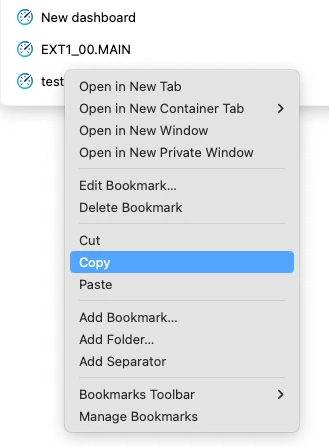
A trick I learned from a user recently though, is that a URL copied from certain other places, will have the target omitted, thus opening in the same tab. This is true for browser bookmark links, for example. A quick workaround I now use to have a link open up in the same tab is to temporarily bookmark the target URL, copy it from the bookmark, and paste this directly into my text tile editor. The resulting link will open in the same tab.
URLs in dashboards are often used to link dashboards together. The can be used to jump from high level dashboards to more detailed dashboards and back. Opening in the same tab certainly makes that experience nicer.
Another small tip for this workflows is to include the ?mode=presentation in the dashboard URL (as in the link example above). This will open the underlying dashboard directly in full-screen presentation mode, rather than starting in the default edit mode.