














Discover our learning resources and share your experiences...
Recently active
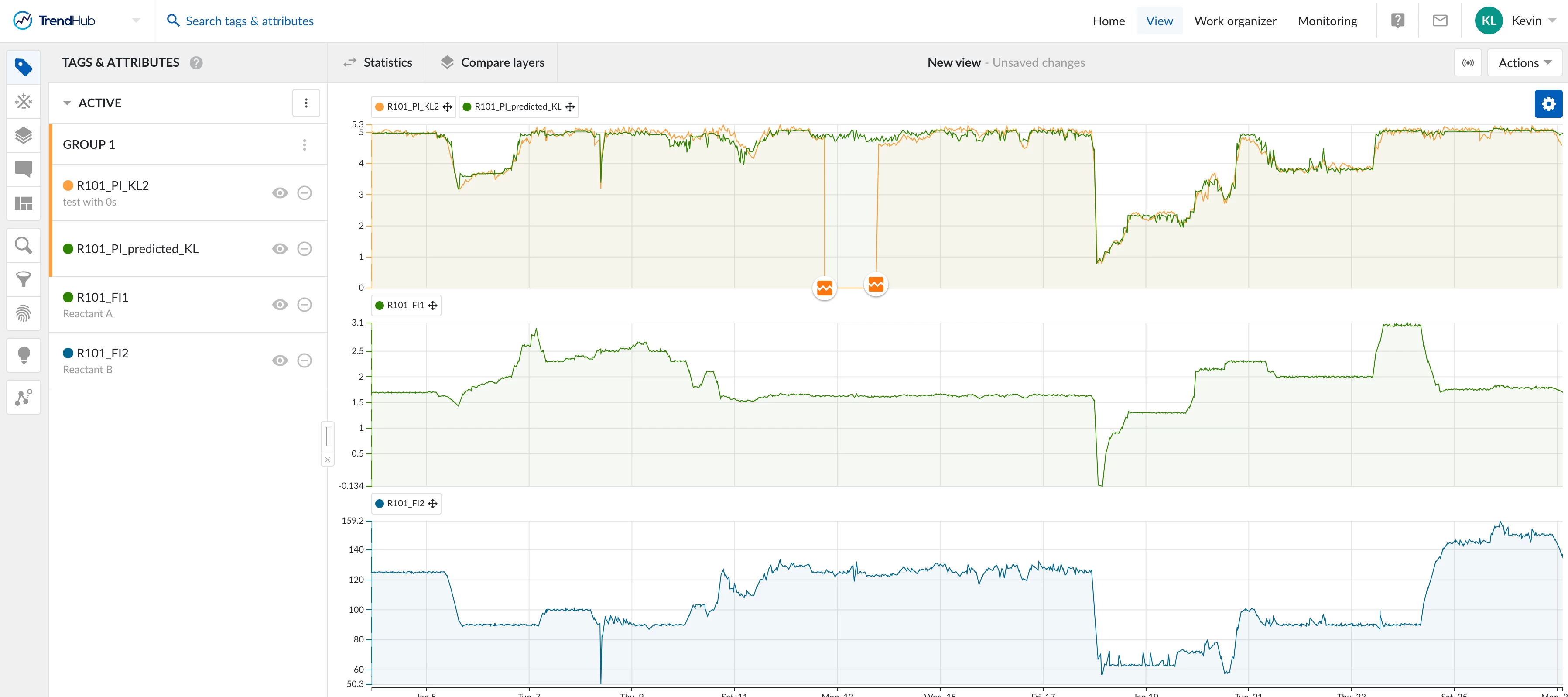
BackgroundSoft sensors, also known as inferentials, play a crucial role in industrial processes by predicting important lab values or other slow-sampled variables. In many manufacturing environments, the process involves monitoring various parameters that are critical for quality control or process optimization. However, some of these parameters, such as lab values, are slow to sample due to the time required for testing. This delay can hinder real-time decision-making and potentially lead to inefficiencies or quality issues. Soft sensors offer a solution to this challenge by using fast-sampled inputs as inputs to a machine learning model. This model can then predict the slow-sampled variables, providing real-time insights without the need to wait for hours for the next lab sample to be tested. Operators can monitor these predictions and make timely adjustments to the process, optimizing operations and ensuring quality standards are met. ChallengeOur primary challenge is to develop a
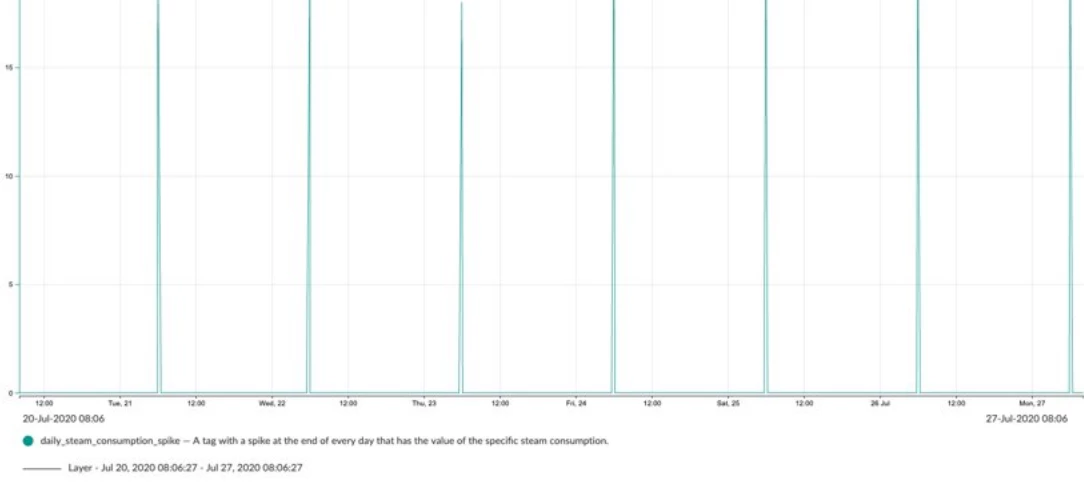
BackgroundThis use case shows how to report the daily specific consumption of a resource and make a comparison between them on a daily basis. At this point we have no way of comparing or keeping track of the specific consumption of a resource. If we would have a tag for this it would be a big help in terms of process and resources optimization, as well as bring economic value. The daily specific consumption will be reported as spikes at the end of each day. As a starting point we have a tag containing our specific consumption of the last 24h. By being able to have an overview of the spikes of all days we can optimize our process. Challenge1. Get a spike at the end of each day with the 24h of total consumption.2. Get the value of different days to compare them. SolutionCreating daily consumption spikesThe daily consumption spikes tag is created by using the formula tagbuilder, we use an if statement where the check is day1=day2 with day 1 current time tag (day) and day 2 1m delayed time
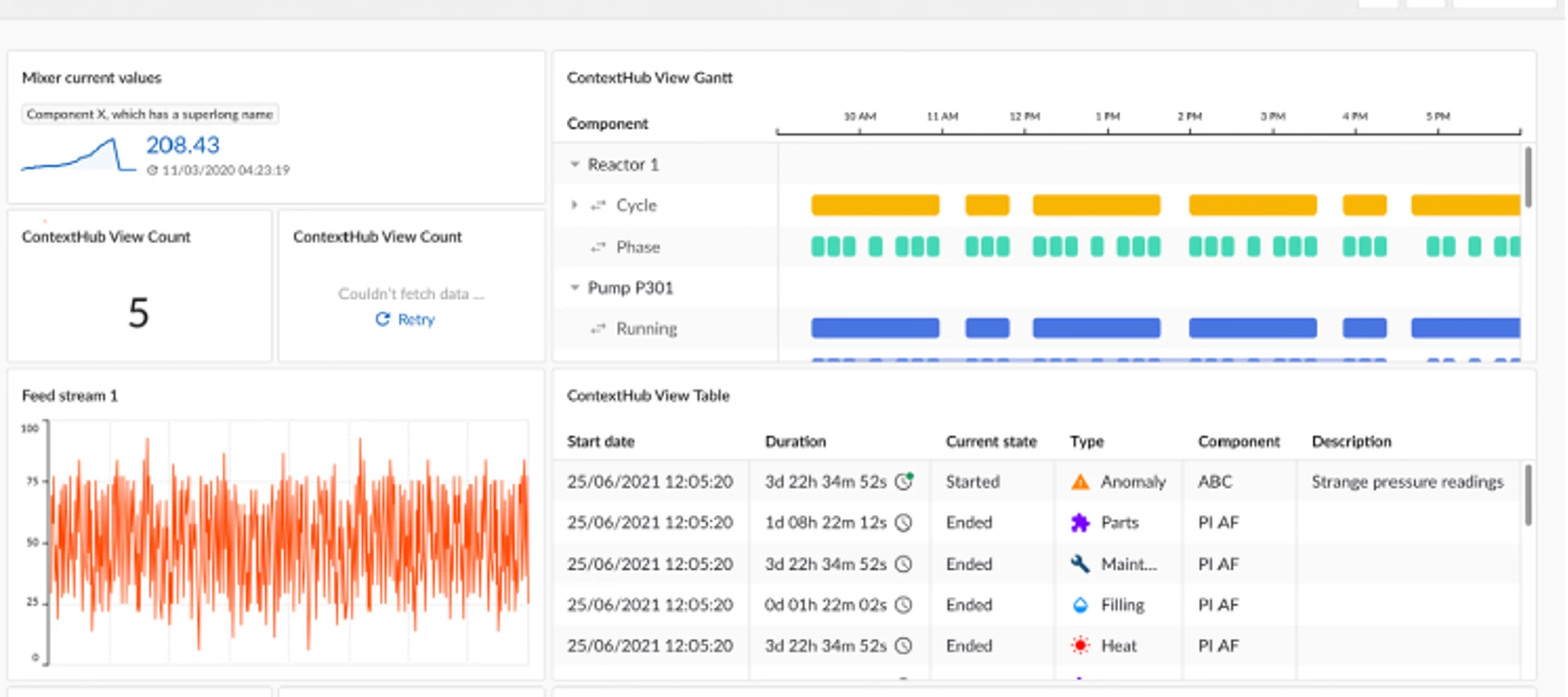
BackgroundIn any industry, It is not uncommon for plant managers to have questions about the status and efficiency of manufacturing units. There can be several hundred or even thousand tags for a single process depending on its complexity. Creating a dashboard allows users to centralize the trends for those tags in a digestible format. ChallengeOftentimes, production questions from management can be time-consuming and even intimidating to address. When a plant manager inquired about the status of a unit in the morning, a dashboard was created to ease their concerns within hours. SolutionIdentify relevant tags Consider what KPIs and parameters are important to management. Some examples are: flow rates for high-cost reactants extrusion rates (if applicable) expensive or shared utilities quality data production rates safety valve positions flaring All of these have financial, environmental, or safety implications.Create views and monitors Create TrendHub views and group r
In this series of posts, we will dive into the building blocks for a personal TrendMiner Coach Success plan. The topic of this second post is Desire. You can find our first post on Awareness here. Definition of DesireThe personal choice to support and engage in getting value form the TrendMiner platform. Planning desire creationDesire can be influenced, but in the end it is a personal choice of each individual to engage with the TrendMiner platform. At first, we want to motivate users to give TrendMiner a shot. We want to create the want to be personally engaged which will make them more resilient to become an advocate later in the process. Why?Personal and organizational motivating factors are needed to fully engage A personal engagement is needed for all subsequent stages of the ADKAR change management framework to have effect Desire creation: Your plan & best practicesAnticipate resistance Think about which points of resistance your target audience might have. An important point
On April 9th, 2024 we hosted an exclusive webinar to discuss relevant topics for TrendMiner admins related to the 2024.R1.0 and upcoming releases (recording below).The following topics were covered:What’s new in 2024.R1.0?A quick overview of functional updates and newly available connectivity options. In 2024.R1.0, we added connectivity for Eschbach Shiftconnector, Wonderware 2020 and 2023 and Aspen APRM v14. A complete overview of supported connectivity options is available here.Admin roles comparedTrendMiner 2024.R1.0 introduces a new admin layer to better separate Infrastructure, System and Application administration tasks. Refer to this topic for a complete overview.About the upgradeThe 2024.R1.0 release introduces some major security improvements in ConfigHub and the way you can access ConfigHub. Refer to this documentation article to learn how to access ConfigHub after the upgrade by resetting the admin user password via Edge Manager. It is advised to only use the admin user for
In this series of posts, we will dive into the building blocks for a personal TrendMiner Coach Success plan. The topic of this first post is awareness. Why do I need a Coach Success plan?A Coach success plan ensures you’re covering the rollout/adoption of TrendMiner with the best practices of change management in mind. The plan helps to avoid pitfalls and to optimize chances of peers achieving TrendMiner value. Definition of AwarenessAwareness is a person's understanding of the nature of the change, why the change is being made and the risk of not changing. Planning awareness creationBuilding awareness can be much more difficult than it sounds. For example, when you hear about a change, do you trust the sender of the message? Do you believe the reasons given for why the change is needed? Even in our everyday life, we encounter many ideas for change in which we do not agree with the messages we’re given. As a TrendMiner Coach, you need to understand the activities that drive awareness &
In this article, we present 4 of our least used but valuable features which you can use to your advantage. We also show some concrete examples. 1 - Operating Area Search Empowers users to intuitively identify optimal and suboptimal operating conditions through a visual interface. Helps users detect process irregularities early by analyzing correlations between parameters. Provides preventive maintenance warnings using the operating area search in a combination with monitors. In the example shown below, the power a conveyor belt is consuming is plotted versus the specific power consumption, which takes into account the mass the conveyor belt is transporting. The scatter plot itself shows that there is an optimal point of operation looking only at energy consumption. Now, this area is selected as area of good operation and is used in the operating area search to look for periods when this correlation is changing, indicating a change in the operating conditions of the belt which me
Implementing new software or technologies requires an investment of time, effort and resources. A well-designed adoption plan ensures that your organization fully utilizes these tools, maximizing the return on investment (ROI). This is no different for a platform like TrendMiner. Below, some hints are shared on what to consider when making such a plan: Begin by understanding your organization’s specific needs, challenges, objectives, and long-term goals What problem does the software solve? How will it align with your business objectives? For example: too many batches are being rejected and the goal is to reduce this amount by 40% by detecting quality deviations. Engage key stakeholders from different departments (such as IT, operations, and end-users) in the planning process Their insights and perspectives are invaluable for creating a comprehensive adoption strategy. For example, when new connections are configured or new functionality is released and timely TrendMiner upgrades are
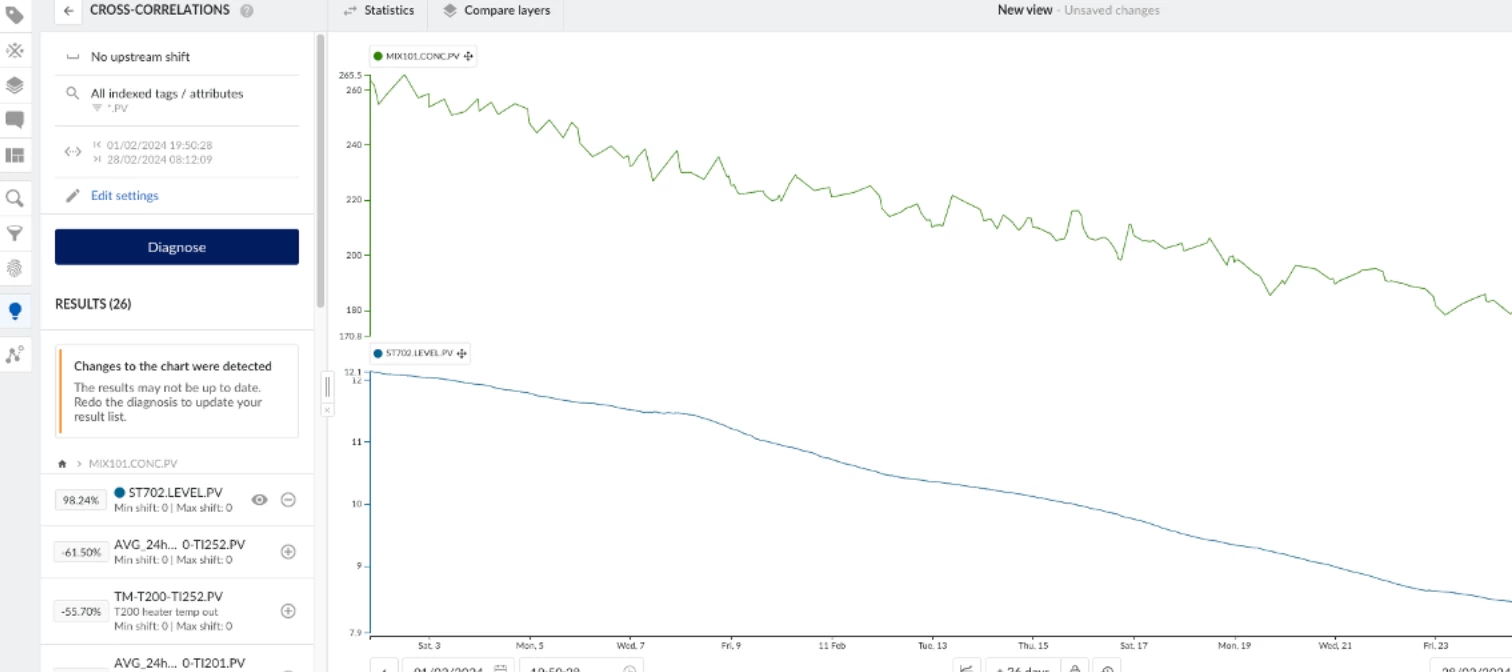
BackgroundThis use case is centered on a mixing tank, where the streams of two distinct products are joined. The intermediate products are continuously added to the mixing tank until it reaches a certain level. At that point, a sample is taken for analysis, and the tank is emptied into a larger storage tank. ChallengeOver the span of a few weeks, there have been crystallization issues with one of the two products. This undesired crystallization interferes with sensors leading to unreliable measurements, which can lead to quality issues as the mixture is processed further.We needed to find the root cause of these crystallization issues. SolutionVisualizing the problem The composition of the samples from the mixing tank was displayed in TrendMiner. Here we could clearly see the concentration of the solvent product decreasing, which is an obvious cause of the other product crystallizing. The question thus becomes: why are we receiving less solvent from our production process? Hypothesis
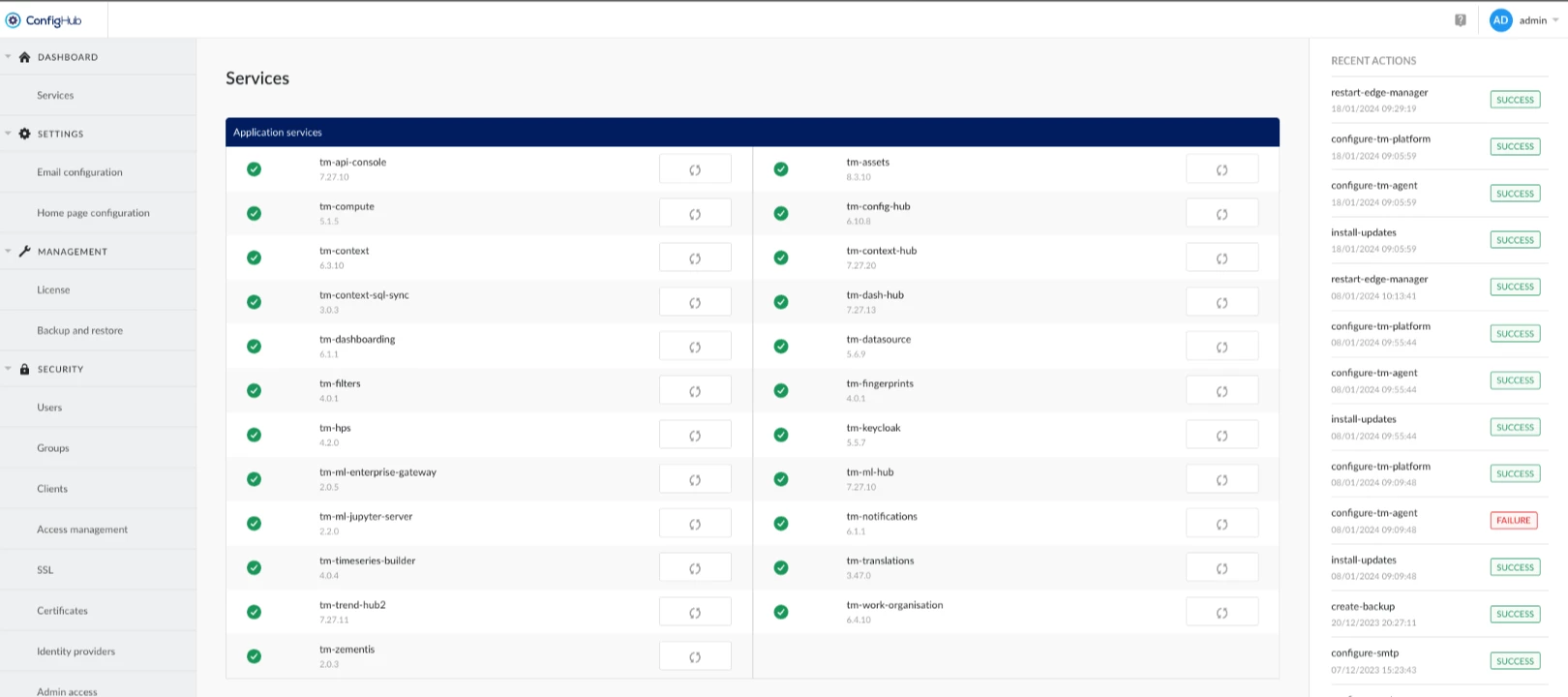
Since TrendMiner version 2023.R3.0 configuration settings have been split up between Edge Manager and ConfigHub. This way, tasks specific to infrastructure admins and system admins are clearly separated and access permissions can be aligned with your organizational structure.Edge Manager is the TrendMiner interface for infrastructure admins. It mainly contains functionality to keep your TrendMiner installation healthy and up-to-date. Edge Manager is not available to SaaS customers as infrastructure administration is taken care of by the TrendMiner team. On virtual appliances, some additional menus for virtual appliance configuration will be available, which do not appear on self-managed single node or private cloud setups. The following tasks can be done from Edge Manager:Checking the health status of TrendMiner services Downloading appliance logs for troubleshooting purposes Gaining insights into memory usage, disk usage (including adding more disk space), CPU usage and time settings
The TrendMiner setup knows 3 different administrator roles:Infrastructure administrator (taken care of by TrendMiner for SaaS setups) System administrator Application administratorThe table below provides an overview of these roles, required skills and access permissions, example tasks and where to perform these tasks in the TrendMiner User Interface.Obviously, one person can take up multiple admin roles, but as different types of tasks are typically distributed over multiple people or teams, these roles permit to match TrendMiner administration to your organizational structure. Infrastructure administrator System administrator Application administrator TrendMiner UI Edge Manager ConfigHub TrendHub, ContextHub, TrendMiner API Description The infrastructure admin is responsible for installation and maintenance of the TrendMiner servers on infrastructure, network and security l
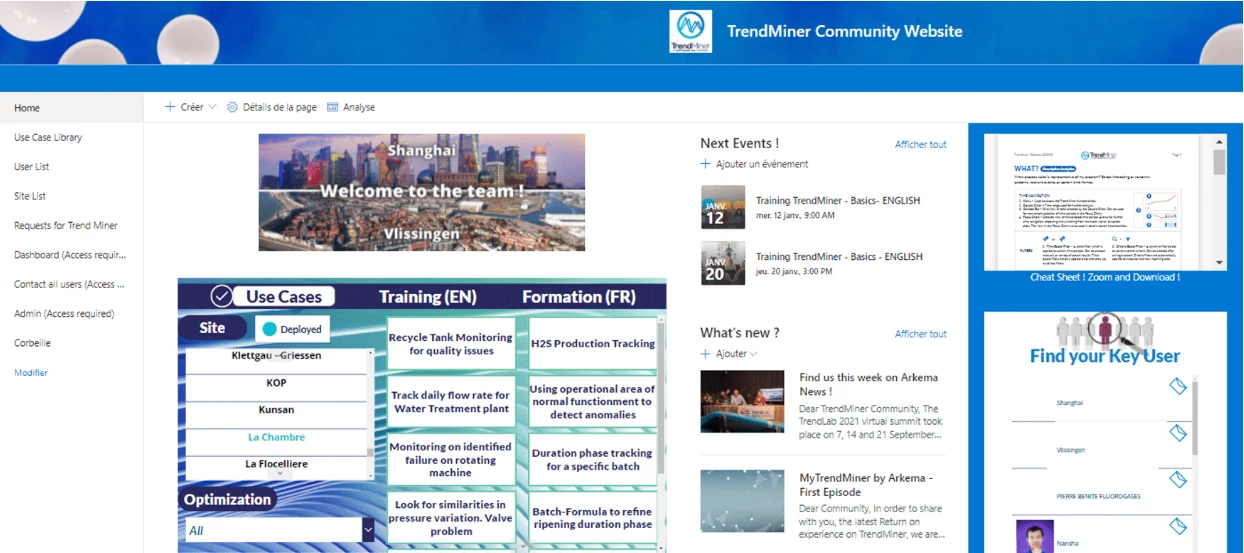
How do you streamline communications around TrendMiner in a large organization? At TrendLab 2021, Nina Mas Soler and Laurent Baseilhac discussed how they use a community strategy to make sure end-users can find and share all information they needed.Some pointers:Survey your end-users to discover how they use the platform and the value this brings Create an internal community website, containing for example: self-paced training videos invitations to online trainings for new users a live chat to internal TrendMiner experts a tool to identify interesting use cases from across the whole organization easy to find contact details of key users in all plants Watch the full presentation here and discover Arkema's priorities for digital manufacturing, what their community strategy entails and what their end-users are saying about TrendMiner.How do you streamline communications in your company? What resources have you created to enable TrendMiner users to generate more value for your compan
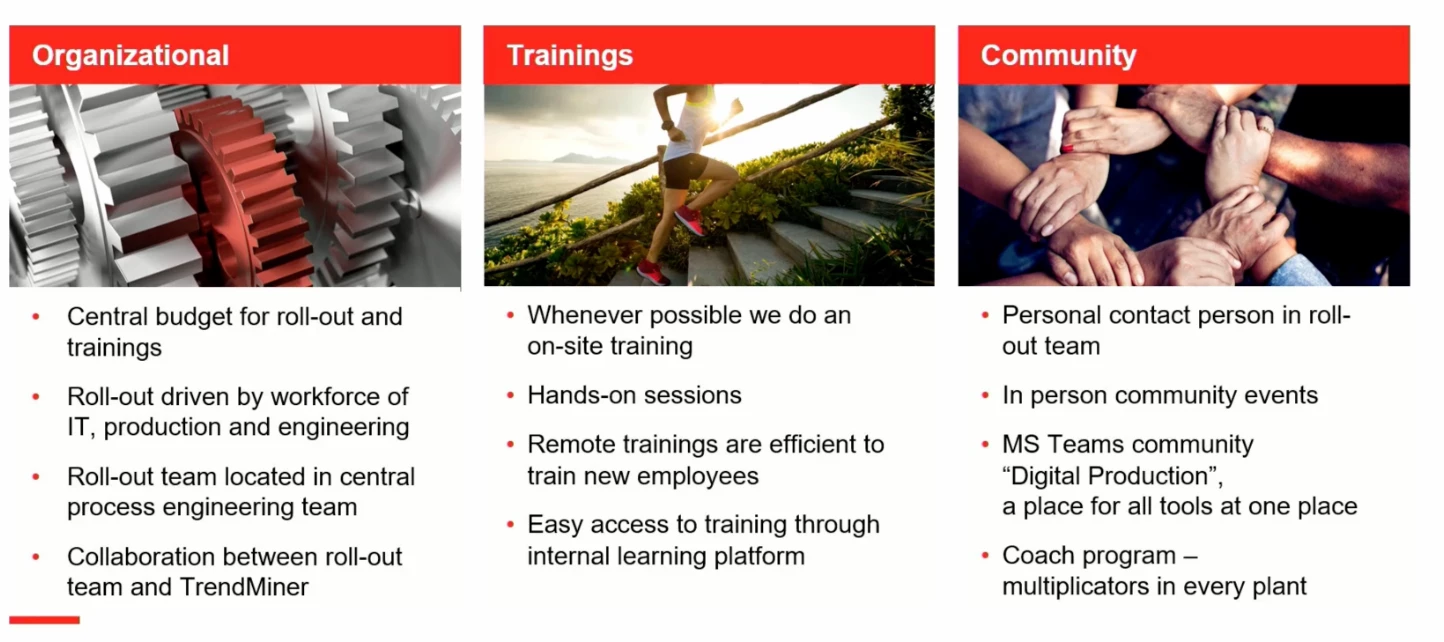
Nils Erwes from Lanxess recently presented their learnings from rolling out TrendMiner globally. Some key success factors he mentioned are:A central cross-functional roll-out team consisting of people from IT, Production and Engineering, collaborating closely with TrendMiner Easy access to training, focussing not only on how to use functionality but also on hands-on practical use cases Establishing an internal community to share experiences and successes, including in-person events and TrendMiner Coaches in every plant Watch the full presentation via this link and discover how TrendMiner fits Lanxess' digital landscape, how they tackled the challenges of a global roll-out and brought TrendMiner to their individual plants, what were they keys to success and how they are continuously building on the value they achieve with TrendMiner.Share your learnings from this presentation below...
To continue to inspire you, the TrendMiner team will regularly add new (general) use cases to this Community. At the same time, we invite all TrendMiner users to share your own use cases.Why share your use case?By sharing your own use case, you …… showcase your TrendMiner knowledge to the wider analytics community 👑… may receive feedback and ideas to further expand your case and generate even more value for your company 💸… inspire other users to make the most out of TrendMiner 📈… help the TrendMiner team understand how our product helps you and further develop it towards your needs 💪How to share your use case?To share your use case, create a new topic in the Use Cases category of this Community. Pick Conversation as the topic type. Feel free to use the template below to include all relevant information.NoteMake sure you are registered and logged into the Community first. Create your account or log in via the LOGIN button top right or the links in the previous sentence. BackgroundP
While we will be sharing use cases in this Community category on a regular basis, our TrendMiner website also contains many use case one-pagers and videos to draw inspiration from, filterable by topic, industry, role and analytics maturity. Check them out via https://www.trendminer.com/use-cases.
Already have an account? Login
No account yet? Create an account
Enter your E-mail address. We'll send you an e-mail with instructions to reset your password.