















Discover our learning resources and share your experiences...
Recently active
Using TrendMiner’s Cross-Correlations Tool for Root Cause Analysis One of the most powerful features within TrendMiner is the cross-correlations tool. It is especially useful when conducting root cause analysis because it helps identify correlated tags that could serve as early indicators for your tag of interest. Identifying the Root Cause of a Process Disturbance Let’s look at an example of how to identify the root cause of a process disturbance.A process engineer monitoring a reactor unit notices an abnormal temperature spike in the reactor. The unit supervisor asks the engineer to determine what may have caused this increase. However, without immediate input from board operators and field operators, it can be difficult to know where to start. Reactor temperature fluctuations can result from many different factors, making troubleshooting a complex task.This is where TrendMiner can help.By using the cross-correlations tool, TrendMiner can quickly compute correlations between the reac
For rotating equipment, we need to seal off moving components with mechanical seals that use a barrier fluid. There is no way to seal off moving components perfectly so there will always be some leakage. If product leakage to the environment is unacceptable (typically for SHE reasons), a zero emission seal needs to be used. For zero emission seals, there can only be leakage from the barrier fluid into the product, which is why a barrier fluid that is under higher pressure than the pumped fluid needs to be used that is compatible with the product. After all, at least some of this barrier fluid will end up in the product. A classical example of this is the usage of N2 as a barrier fluid to natural gas.Mechanical seals are common but critical components, and they can be monitored quite easily in TrendMiner as the monitoring criteria are simply value-based. We can sometimes use a value-based search directly, but if we need to compare two measurement (e.g. to ensure a difference in pressure
Hello 🙂 I’m sure most of you have used popular AI chatbots like ChatGPT, Google Gemini, and others. Based on personal experience using these chatbots, I’ve discovered a few key aspects to keep in mind when prompting them to generate a summary or refine an article. 🔎 Here are three important ones:Be precise when crafting your prompt. The clearer your request, the better the output. ☝ Define your audience. Specify who the article, email, or content is intended for. 🕵🏼 Set the desired complexity level. Indicate whether you want a simple explanation or a more sophisticated, in-depth response. My own experience 👇🏼Recently, while installing cabinetry, I turned to ChatGPT for advice since I'm far from a woodworking expert. After I described my project, it recommended the right screws for the job and even provided a clear step-by-step guide. We’d love to hear about the unique ways you’ve used different chatbots! Share in the comments below!
TrendMiner's monitoring functionality empowers users to create alerts for critical process behaviours. This enables engineers to receive immediate notifications of events that match specific parameters or deviate from expected patterns. (See real-world examples on how to be compliant with ISA 18.2 standards from Bayer and a helpful Tip&Trick to detect short duration events). Learn more about setting up monitors in our user guide.While TrendMiner's default setting allows for 10 active monitors per user, we understand that your needs may exceed this limit. To ensure you can fully leverage TrendMiner's capabilities, we offer the option to increase your active monitor capacity. ↗️By expanding your monitor limit, you can gain even greater control over your processes, proactively identify potential issues, and optimise your operations. Don't let limitations hold you back from maximising the value TrendMiner brings to your company‼️Contact your Customer Success Manager (CSM) or TrendMiner
TrendMiner delivers significant value across various operational areas, enabling organizations to achieve measurable ROI. By addressing key questions, sponsors and project managers can identify and quantify the impact of TrendMiner in their processes. Below are just a few critical areas where TrendMiner drives efficiency, quality, and cost savings.1. Process EfficiencyKey Question: How has TrendMiner reduced downtime or prevented unplanned shutdowns? Impact: Even a 1% improvement in process efficiency can result in substantial cost savings.2. Product QualityKey Question: Has TrendMiner helped reduce product variability or defects? Impact: Improved product consistency minimizes raw material waste and enhances process reliability.3. Energy ConsumptionKey Question: What is the most energy-intensive process in your operations? Impact: Optimizing energy usage reduces costs and supports sustainability goals.4. Accelerated Troubleshooting and Root Cause AnalysisKey Question: How has TrendMine
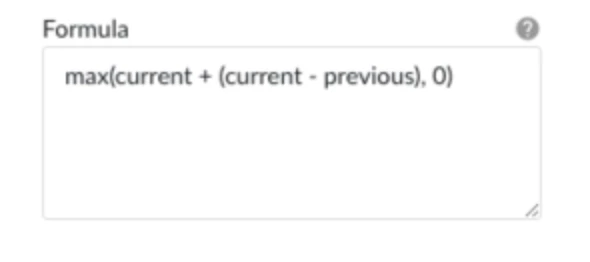
Hello 🖐🏻Identifying periods where parameter readings increase or decrease is crucial for process monitoring!🤔Why it matters? Changes often indicate potential issues or opportunities for optimization.✍How to analyze? Calculating the derivative of a tag allows for a more precise assessment of how sensitive a process is to fluctuations in specific parameters.📊 In TrendMiner : Different methods are available to determine the derivative based on the type of analysis needed. 👉🏻 Preparation: Smoothing Signals For noisy or highly fluctuating signals, it is recommended to perform an aggregation before calculating the derivative.This helps achieve a more accurate approximation of the derivative of the selected function.Recommended Aggregation:Tag: The tag for which the derivative should be calculated Operator: Average Direction: e.g., Backward Aggregation interval: e.g., 10 minutes 👉🏻 Option A: Calculating the Derivative Using a Formula The derivative can be determined by calculating
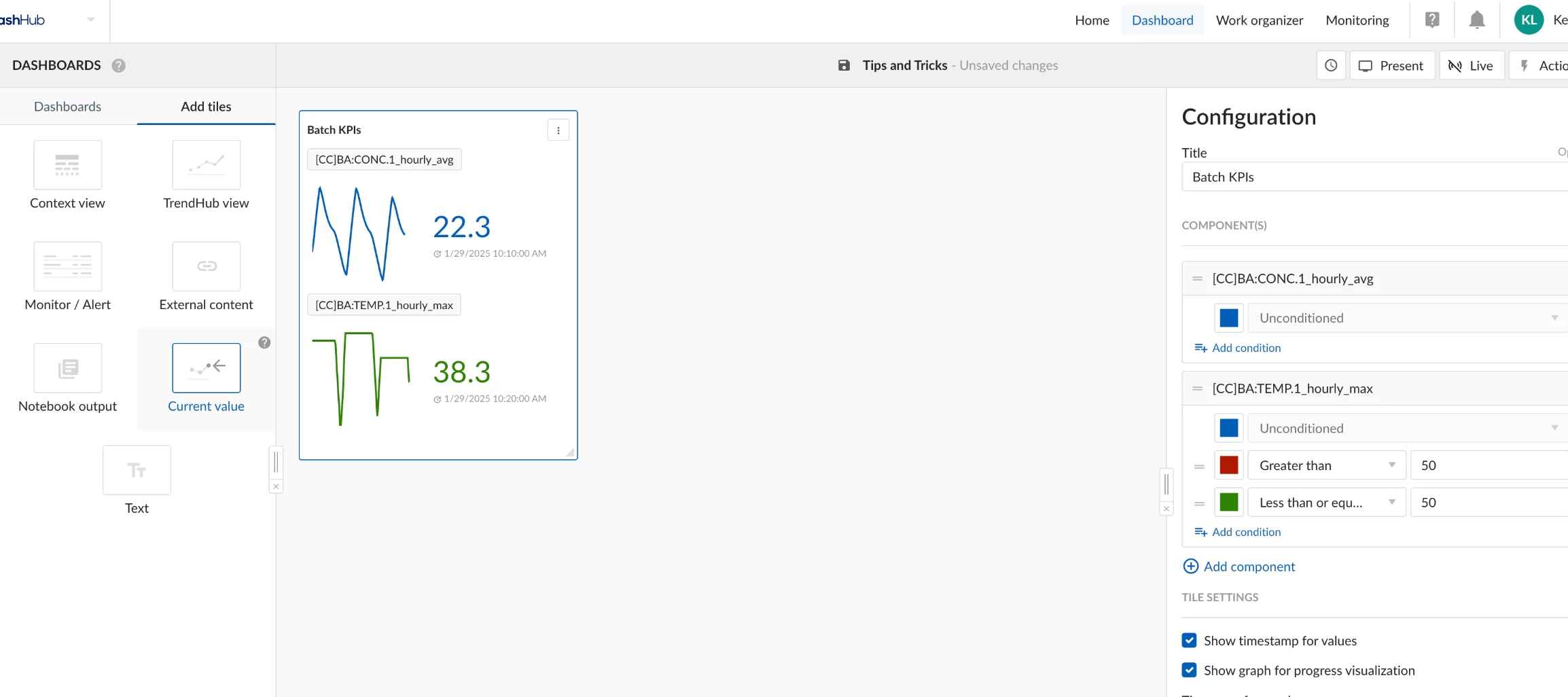
In this post, we will cover how to create a KPI tag using tag aggregation and how to track the KPI in real time within a TrendMiner dashboard. This example begins in TrendHub, where we create the aggregation tags, and then transitions to DashHub, where we use the current value tile to display the KPI in real time. Creating KPI Aggregation Tags in TrendHubIn TrendHub, we can create an aggregation tag from process tags. For example, if we want to calculate the 1-hour average of concentration, we can aggregate the concentration tag and select the average operator. This will be the first KPI to track. The second KPI is the maximum temperature from the past hour. Instead of the average operator, we need to select the maximum operator and apply it to the temperature tag. The screenshots below illustrate the parameter selection for creating these two aggregation tags in TrendHub.Creating the [CC]BA:CONC.1_hourly_avg tag: tag aggregation with average operator and backward 1 hour specification.
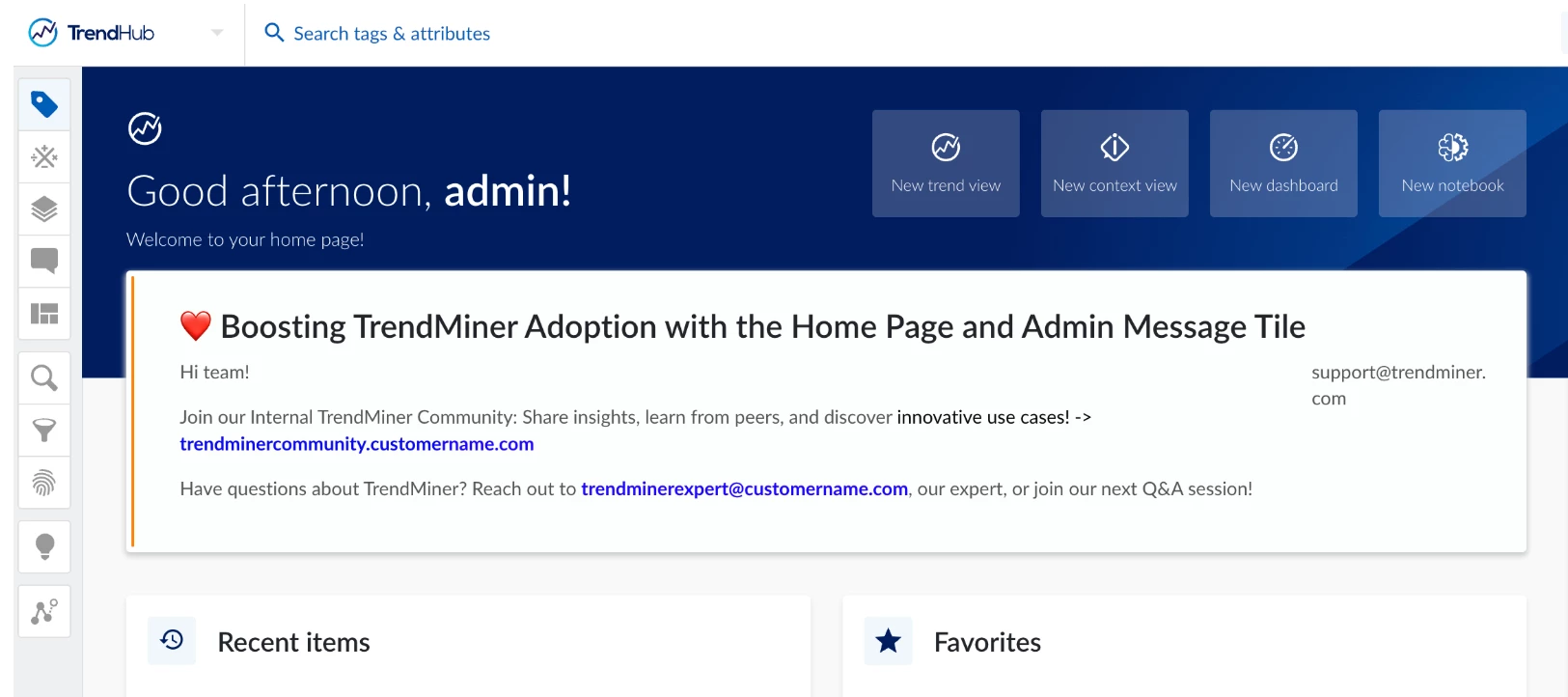
TrendMiner Home PageThe TrendMiner home page is more than just a starting point—it’s a powerful tool to drive user engagement and adoption.Next to recent items and favorites section, the help center provides access to useful resources that can help you to use TrendMiner effectively. Including links to user guides, FAQs, contact details for customer support, and other relevant assistance. It also shows upcoming trainings like the monthly basic guide and advanced level webinar.The admin message tile, often used for announcements like system updates or maintenance, can also be a creative space to boost adoption. Here’s how: 1. Link to Your Internal TrendMiner CommunityPromote collaboration by linking forums, knowledge bases, or shared platforms. A message like: "Join our Internal TrendMiner Community: Share insights, learn from peers, and discover innovative use cases!" ...can inspire active participation. 2. Highlight Rollout Leaders or Key ContactsShowcase rollout champions or TrendMine
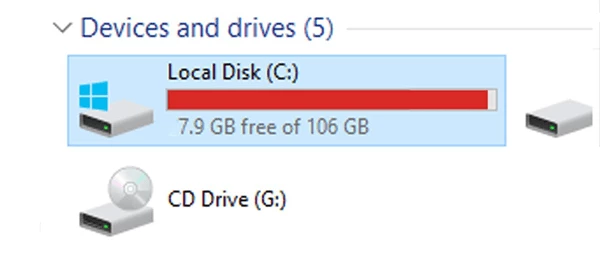
The TrendMiner connector, also known as the Plant Integrations server, operates on Microsoft IIS (Internet Information Services). A common challenge with IIS is that its logs can grow rapidly, potentially consuming significant disk space if not managed proactively.IIS generates log files for each website hosted on the server. These logs are organized into folders named 'W3SVCX,' where X represents the unique ID of the website. For example, on a typical TrendMiner connector setup, you might find log files in directories such as:C:\inetpub\logs\LogFiles\W3SVC1 C:\inetpub\logs\LogFiles\W3SVC2As IIS log management is specific to Microsoft, TrendMiner recommends referring to Microsoft's official documentation for best practices on managing IIS logs effectively.To support troubleshooting efforts, it is advisable to retain the last 10 days of IIS log files. This ensures that any log data required by TrendMiner support is readily available while preventing excessive disk space usage.Proactivel
Hey everyone! 👋The recording of our January 2025 webinar Value Based Searches – Tips & Tricks is now available!🎥 Check it out to learn:The importance of a 2x index resolution as the minimum duration for searches 🔍 Tips to identify short peaks in your data more effectively 📊 How to search for events within specific durations ⏱️ Advanced techniques for combining AND/OR conditions to enhance your search results 💡Watch the Recording:German – Wertbasierte Suchen – Tipps & TricksEnglish – Value Based Searches – Tips & Tricks Access the Slides:GermanEnglish Got any questions or need further details? Write them in the comments below, we’re happy to help! 😊Enjoy exploring! 🚀
Hello, 🖐🏻 Here is the recording of the presentation of Lauren Steven from Bayer at TrendLab Americas! In this recorded session, Lauren highlights how TrendMiner serves as a powerful tool to drive improvements in five critical areas: safety, environmental compliance, downtime, optimization, and mechanical integrity. With TrendMiner, she created a search to generate context items that monitor the status of their unit and track each reactor’s downtime. This allows their team to quickly assess situations and respond accordingly, thus improving the overall agility in their operations. Additionally, she has implemented a dashboard using the red, yellow, green light method.This visual approach facilitates quick access to plant process information, improving the speed and accuracy of decision making. The implementation of these methodologies not only enhances the team's ability to monitor and respond to downtimes but also integrates safety measures and alarms that safeguard operational proc
Tag filters in TrendMiner help you include only the tags you need by using regular expressions. This ensures clean, organized data and avoids syncing irrelevant tags.Only tags that adhere to the regular expression will be synchronised to TrendMiner.Tag filters can be added when creating or editing a datasource:Examples of Tag Filters Match Specific Tags Regex: LINE.[1]+ Effect: Retains only tags starting with "LINE.1". Exclude Certain Prefixes Regex: ^(?:(?!BA:TEMP).).*$ Effect: Excludes all tags starting with "BA:TEMP". Filter by Prefix and Source Regex: ^\[pref\]PI.*$ Effect: Syncs tags with prefix "[pref]" that start with "PI". Tips for Using Tag FiltersTest your regex to ensure it matches the desired tags. Combine with unique prefixes to prevent duplicate tag names.
TrendMiner is a powerful software tool for analyzing process data, and its user-friendliness is enhanced by the ability to customize the interface language. Changing the language is one of the most frequently asked questions from our community, especially when a global team with diverse linguistic needs is collaborating on a project. How TrendMiner Determines the LanguageTrendMiner automatically adopts the language set in your browser. To adjust the language, you’ll need to update your browser settings, as explained below for different browsers.Supported languages are English, German, French, Spanish, Portuguese and Chinese. Browser-Specific Considerations: 🌐 Google Chrome: Chrome often uses the preferred language set in the browser settings. To check or modify this: Navigate to Settings > Languages. Add your desired language and set it as default. Restart TrendMiner if the changes are not immediately reflected. 🦊 Mozilla Firefox: Firefox also follows the language preferences
Tag indexes are crucial in TrendMiner since analytics are based on these indexes. Also, tag indexes are used as a sort of cache to chart data which reduces the stress on the historian/data source. For these and other reasons it’s important to have well performing indexing on your TrendMiner installation. There are 2 very simple and easy accessible indicators which can give an idea about the health of your indexing:Index manager: in an ideal case all indexed tags should be updated at least once an hour. To check if that is the case you can open the index manager, sort by ‘last updated date’ and verify that the oldest updates are no longer than 1 hour ago. Check the data source metrics in ConfigHub: if the metrics are bad it could be worth checking for optimizations. There are no strict limits between good and bad performance and other factors like the number of data sources and indexed tags all play a role in the general performance, but in general index operations metrics should no
Hello ✌🏻Here is the Arthur Fernandes' (@arthurfornari) engaging presentation at TrendLab 2024 Americas. Nouryon utilized DashHub to identify process inefficiencies and reduce waste, applying Lean Six Sigma principles. TrendMiner enabled faster data analysis through pre-set dashboards, allowing for more efficient decision making. By using data driven insights, they were able to pinpoint opportunities for improvement, optimize monitoring, and engage with process stakeholders for effective follow-up and validation of solutions.Additionally, they highlight the initial use of MLHub and outline plans to leverage machine learning algorithms further in the future. Arthur’s presentation was not just informative but also showcased practical applications and success stories, leaving attendees inspired to implement these strategies within their own organizations. 💡 Did Arthur’s insights resonate with you? We would love to hear your thoughts. Sharing your experiences can inspire and benefit the e
When creating context items via search results, it is often useful to map calculations on your search results to a context field for that context item. Once the calculation is mapped to the context item, the calculation can be displayed as a table column in your context view. This feature can come in handy when you want to display metrics or to report KPIs. We will explore a batch example where we leverage this feature. Consider a batch process where a variety of product grades are manufactured. For a specific product grade, for example product ALPHA, we would like to know the total feed throughput as well as the max quality during the batch. For this demonstration, we will be using the TM-BP2-PRODUCT.1, TM-BP2-QUAL.1, and TM-BP2-CW.1 tags.TrendHub view with PRODUCT, QUALITY, and FLOW tags. 1. Create context items via value-based searchTo begin, start a new value-based search to identify periods when product ALPHA is produced.Create a value-based search for ALPHA batches. 2. Add calcul
Best Practice for Tag Nomenclature in TrendMinerOrganizing tags effectively is crucial for efficient data analysis in TrendMiner. A clear and consistent naming convention allows teams to quickly identify, manage, and collaborate on tags. To address this, we recommend adopting a structured format that simplifies tag creation and ensures long-term usability.Using a standardized approach benefits everyone involved. Whether you’re searching for specific types of tags, identifying a calculation, or finding the creator of a custom tag, a proper naming convention saves time and effort. This system ensures that tags are intuitive and easy to understand, even for new team members, while also enabling existing users to locate information quickly and reliably. Introducing a Drop-Down Menu Solution in ExcelTo make this system even easier to use, we’ve developed an Excel template where users can generate tags effortlessly. The template features drop-down menus for each part of the tag name, so user
You may have experienced that when working with stepped tags in formulas, your output is not quite what you were expecting. As an easy example, let's look at a batch process where we have a a discrete tag with the quality (top), and a digital tag with the product name (middle). Suppose now we want to create a tag that only shows the quality when the product is Alpha, you might think to implement it as in the screenshot below. However, as you can see, the result (bottom tag) is not quite what you would be expecting: So why we do we get this sawtooth pattern? The first thing to understand is that our resulting formula tag only gets calculated where one of our input tags has a datapoint. Where there is a datapoint for any of the input tags, values for the other input tags are obtained through interpolation. The second factor that gives us this result in that formula tags are always of the analog type, meaning the interpolation is linear. Since our underlying discrete tags are sparse (the
TrendMiner automatically syncs with your LDAP/Active Directory (AD) provider at regular intervals defined in the LDAP sync settings. For example, if the sync interval is set to 1 day, any new LDAP users or groups added to your Active Directory may take up to 24 hours to appear in TrendMiner’s user or group list.In some situations, this delay may not be ideal. Fortunately, TrendMiner allows you to trigger a manual sync of an LDAP provider to expedite the process. Steps to Manually Sync an LDAP/AD Provider 1. Log in to the ConfigHub Portal: Access the administrative portal for TrendMiner. 2. Navigate to Identity Providers: Under the SECURITY section, locate the Identity Providers list. 3. Select the LDAP Provider: Click on the LDAP provider for which you want to trigger a manual sync. 4. Initiate the Manual Sync: In the LDAP Details panel, click the Options drop down menu, then select Sync Provider. 5. Verify the Results: Once the sync is complete, the newly added users or grou
We can finally share how we are using TrendMiner at Heraeus in our polymer production plant in Leverkusen to increase operational excellence! Hopefully, this resonates with some of you. We would be very happy if this glimpse into our work can open a conversation to share experiences and knowledge within the community. Please find the the story here.
Hello 👋🏻Operational efficiency is crucial for maintaining productivity and reducing costs in any manufacturing process. LyondellBasell faced significant operational challenges, resulting in production losses and high maintenance costs. Their previous campaigns were inconsistent, with varying operational issues making it impossible to directly compare past datasets. To address these issues and prepare for future campaigns, they needed a reliable baseline.Fortunately, TrendMiner's MLHub was instrumental in addressing these issues. How TrendMiner helped?Analyzing past campaigns Identifying process variables that impact reactor performance Building regression models to identify performance independent of unit operational mode/regimeAdditionally, it has been key in helping to generate comprehensive reports, streamlining data-driven insights for improved decision-making.👉 For more information, watch the recording of the presentation by Sean Heffernan (@smheffer) and Joe Zimny at TrendLab
Implementing a new platform comes with its share of challenges, especially when ensuring consistent adoption among users. Whether you're a key user or the project manager driving the implementation, here are five strategies to help you tackle adoption challenges effectively.Motivation: Intrinsic and Extrinsic RewardsIndividuals are motivated by different means - intrinsic (a sense of purpose or mastery) or extrinsic (recognition or incentives). Understanding the motivators for your team will drive better engagement. Frame adoption as an opportunity for team members to enhance their skills and contribute to organizational goals.Integrate Training into DevelopmentAdoption isn’t just about familiarity—it’s about mastery. Incorporate TrendMiner into your team’s training curriculum and ongoing professional development. Ensure training is role-specific and hands-on. I once came across a quote by Ben Franklin that reads, "Tell me and I forget. Teach me and I remember. Involve me and I learn."
Encouraging TrendMiner users to present successful use cases not only highlights the value of data-driven insights but also motivates employees to maximize their skills. By offering an incentive for the best use case, showcased in a meeting with other colleagues, the company can drive collaboration and efficiency improvements across teams. Benefits for the CompanyEnhanced Motivation: Incentives encourage employees to explore new solutions and share impactful results, increasing their engagement and creativity with TrendMiner. Knowledge Sharing: Presenting top use cases enables others to learn from proven solutions, creating a culture of shared learning and best practices. Company-wide Efficiency: Replicating successful solutions across departments accelerates process improvements and increases overall productivity. Possible Incentives for EmployeesThe most impactful use case each year could be awarded the TrendMiner of the Year title, along with the TrendMiner Award as recognition for
Here is the recording of Marc Pijpers &Sebbe Lecocq (@Sebbe) at TrendLab 2024 Europe, where they shared how Sitech used TrendMiner to optimize production, avoid quality losses, and proactively resolve issues.Sitech faced reduced production speed and quality issues when switching from product A to B. Using TrendMiner, they quickly identified off-spec periods, calculated the feed/production speed ratio, and analyzed the ideal operating curve with xy diagrams. New conditions were set based on this analysis, avoiding €0.5M in quality losses, decreased downtime because of good preparation. For an in-depth understanding of Sitech's application of TrendMiner and the results achieved, watch their presentation at TrendLab 2024 Europe:
Implementing and evaluating new data tools often involves two main phases: Implementation and User Adoption. While the technical aspects of implementation are crucial, the success of a new tool ultimately depends on user adoption.Many organisations struggle with the second phase, user adoption and change management. We have already shared plenty of advices regarding adoption and change management, but from our experience, one crucial factor for a successful TrendMiner adoption is the creation of an internal SharePoint to track all actions, projects, sessions, and reports.Our most successful customers have found immense value in creating a centralised repository for TrendMiner use cases and investigations. This empowers both new and experienced users to learn from each other, multiplying the benefits of TrendMiner across your organisation.An internal SharePoint can act as a valuable toolkit for your team. Whether you're a new user seeking training, an intermediate user searching for use
Already have an account? Login
No account yet? Create an account
Enter your E-mail address. We'll send you an e-mail with instructions to reset your password.